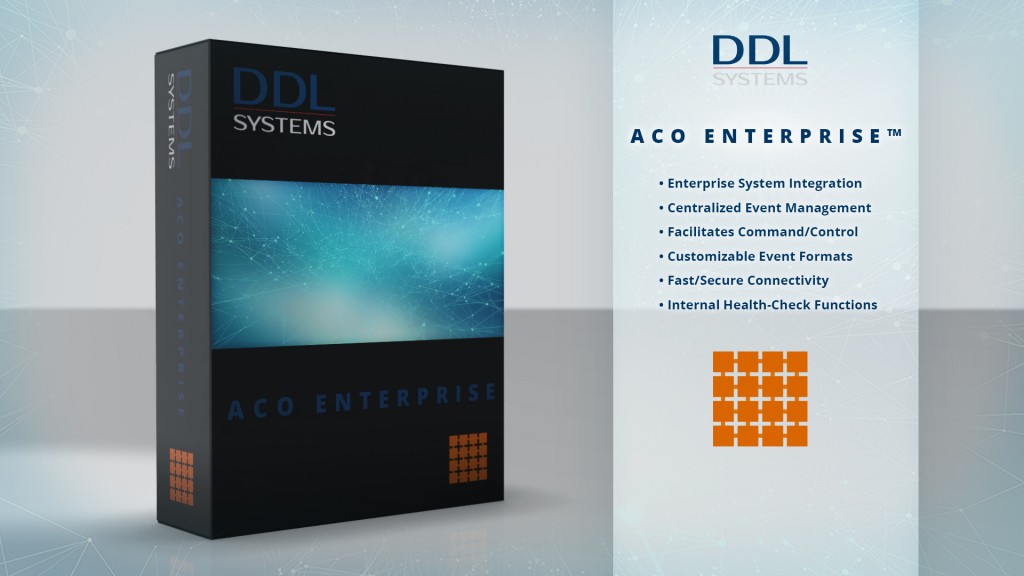
Powerful enterprise technology that simply works
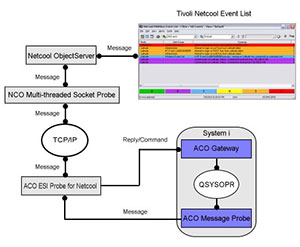
- INTEGRATES your IBM i server(s) with the enterprise
- ENSURES “end-to-end” problem resolution
- PERFORMS smart event filtering and command-and-control functions
- ENABLES fast switching to primary/secondary enterprise systems
- CUSTOMIZABLE enterprise message formats
- AUTOMATES system health-check and internal maintenance functions
- PROVEN technology that is capable of processing thousands of mission-critical events daily
- IMPROVES productivity – personnel are generally happier, less stressed, and their work experience is much more enjoyable

Download the HP Openview integration data sheet
Download the IBM Netcool integration data sheet
Download the SYSLOG integration data sheet
Some of the links on this page may require Adobe Reader to view them. The Adobe Reader is available for download free of charge, by clicking here.
Reliable end-to-end problem resolution that’s scalable to the enterprise
ACO ENTERPRISE™ leverages the advanced monitoring capabilities of ACO MONITOR™ and incorporates enterprise technology to ensure complete “end-to-end” systems management and problem resolution functions. The software’s automation agents/probes work in conjunction with your enterprise monitoring system and facilitate automated operations functions on all connected IBM i systems.
Events that you consider significant are transformed into consistently formatted enterprise message packets. Use the pre-configured packet definition, or create a customized format based on your specific requirements.
Packets are sent to the enterprise system by means of a highly efficient socket-based agent/probe and are subsequently parsed by an enterprise script (or workflow). The script may invoke a variety of sophisticated graphic displays, voice/video, notification functions, or can optionally perform specific IBM i automation routines.
Based on the specific script (or workflow) logic, the enterprise system can process IBM i auto-reply/forwarding commands via the ACO ENTERPRISE™ agents/probes. All command-and-control functions are validated for accuracy and processed on the IBM i partition needing assistance. ACO ENTERPRISE™ even sends acknowledgments informing the enterprise system that its directives were successful – all with split second precision.
Real benefits to your enterprise are:
- Integrates IBM i with your enterprise system
- Centralized event monitoring
- Reduced enterprise system traffic
- Ensures high availability
- All the benefits of ACO MONTIOR™ are also realized
Smart event filtering reduces enterprise traffic
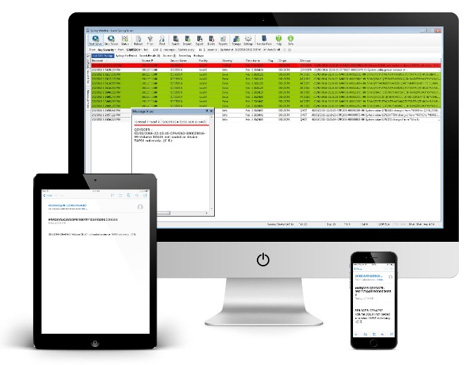
The ACO ENTERPRISE™ agents incorporate smart filtering technology. Based on your user-defined instructions, only critical events are sent to the enterprise system. In fact, most status and informational messages are completely filtered – significantly reducing the volume of events requiring enterprise system intervention.
Use the software’s threshold and dependent messaging features to initiate corrective action prior to notifying the enterprise system. Define thresholds (e.g. number of times sent, time interval etc.) to perform “localized” recovery actions while the event is operating within the threshold limits.
In most cases these localized recovery functions can resolve the issue without utilizing enterprise system resources and/or technical support personnel. However, if the thresholds are reached, the event can be immediately forwarded to the enterprise system to initiate more detailed problem resolution procedures.
Automatic health-checks ensure high availability
ACO ENTERPRISE™ consistently initiates “heart-beat” and other scheduled health-check functions that ensure high availability. These transactions can be automatically triggered at certain intervals from the software’s health monitor or (optionally) from the enterprise client – continuously verifying enterprise system connectivity.
ACO ENTERPRISE™’s agents/probes can also periodically check when the enterprise system last connected. In the event this user-defined interval is exceeded, ACO ENTERPRISE™ can initiate automated recovery actions and/or notify the correct on-duty technical support personnel.
ACO ENTERPRISE™ also performs validation checks on its own internal functions. If these critical agents/probes are unexpectedly down, the software can automatically perform restart/recovery procedures. ACO ENTERPRISE™ can even be configured to quickly switch to a secondary enterprise system in the event of a planned (or unplanned) outage.

Reliable and thoroughly tested
ACO ENTERPRISE™ is capable of processing thousands of mission-critical events daily. The software has been thoroughly tested, is compatible with all currently supported releases of IBM i, and has earned IBM’s “Ready for Power Systems” validation.
Simple cost-effective licensing model
Unlike the competition, our licensing is not model, feature, or user based. This means that licensed customers:
- Never experience an upcharge as a result of an upgrade
- Are never charged for a TEST partition
- Can (optionally) lease the software (SaaS)
Request a quote and let us show you how cost effective running ACO ENTERPRISE™ can actually be!
Less stress for your personnel

Don’t be this guy! Your personnel deserve a less stressful work life. Let ACO ENTERPRISE™ manage the complexities of running your IBM i server network. Retaining qualified technicians and other key data center personnel is critical to your business continuation strategy.
Utilizing ACO ENTERPRISE™’s advanced automation features allows your personnel to focus on more important business issues – resulting in happier, less stressed, and more productive people.
Need more information?
Our sales professionals are ready to answer your questions, perform a live demo, or provide a quote.