|
|
 |
 |
|
ACO PAGER MANAGES
your System i 24-hours a day and notifies you immediately when problems occur.
ACO PAGER™ is a complete systems management solution for the IBM System
i® midrange computer system that monitors System i message queues
(including QHST), job queues, output queues, spool files, libraries,
configuration objects/devices, IFS objects, active jobs, System i email,
TCP/IP network devices, and much more. Specifically, it is designed to
assist with automated computer operations by providing sophisticated
message control, filtering, routing, auto-reply and notification
facilities in response to System i® system/application events. However,
ACO PAGER™ doesn’t just simply react to System i events; it proactively
keeps a watchful eye on any system/application object you consider
important and takes corrective action when (or before) failures occur.
ACO PAGER™ even performs internal system health functions that ensure
high system availability.
ACO PAGER™ ENHANCES your system operations by initiating consistently
accurate response and notification procedures while remaining virtually
transparent to operations personnel. Only critical messages are forwarded to the system operator
message queue. Most status and informational messages can be filtered by
the Message Monitor, significantly reducing the volume of messages
requiring operator intervention. There are no new programs for the
operations staff to learn since normal i5/OS message facilities are
used.
ACO PAGER™ IMPROVES personnel and data center productivity to ensure fast
and efficient message response when your System i® needs assistance. Actual system generated text messages
are sent immediately to specific individuals (or groups of individuals)
responsible for managing the event via nationwide (or regional)
messaging services. Sends delayed messages, broadcast messages, and
determines the "on duty" individual or group to be paged based on
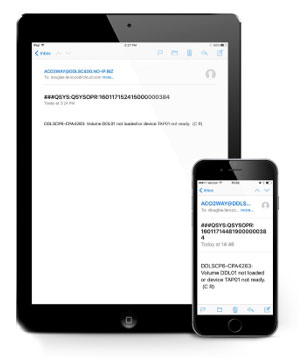
assigned work schedules. Use the software’s "built-in" two-way messaging
agent and virtually any two-way capable device (e.g. cellular phone,
pager, Smartphone, e-mail client, or web browser) to receive and respond to System i®
events. Utilizing ACO PAGER™ advanced monitoring, alert, and escalation
facilities, your personnel simply cannot miss messages that your
installation considers significant.
ACO PAGER™ is EASY to install and is pre-configured to monitor your
system out-of-the-box. Many of the software's advanced monitoring features are ready for your
system to use once you install and start the monitors. Unlike other
solutions, ACO PAGER™ does not require your personnel to acquire
detailed product knowledge in order to take advantage of the software's
advanced monitoring capabilities. In fact, most installations are up and
running (utilizing the basic system/application monitoring facilities)
within the same business day.
ACO PAGER™ is SCALABLE and can be easily integrated with sophisticated
enterprise systems like IBM Tivoli® Monitoring or IBM Tivoli®
Netcool/OMNIbus
(requires ACO
Enterprise System Interface™ not included). Whether your firm manages
one System i (or an entire network of System i machines/partitions)
ACO’s software agents/probes provide efficient "bi-directional" event
management and control information to (and from) your enterprise system.
These automation products will help your firm dynamically monitor and
control mission critical resources and machine availability on all of
your System i systems within your heterogeneous platform data center.
ACO PAGER™ is PROVEN
technology capable of processing thousands of mission-critical events
daily.
Managing the complexities of today's operating systems, business
applications, and networks challenges even the most knowledgeable IT
professionals. The cost to an enterprise of unplanned downtime, loss of
human expertise during sick leave or vacation, and system/application or
environmental failure can be devastating. ACO PAGER™ makes increasing
use of your existing expertise to avoid these situations. No other
system lets you manage your System i with the same depth of automation,
consistency, accuracy, and convenience as the ACO PAGER™ Message Alert
System. |
 |
|
|
Go back to
top of page |
 |
|
 |
Product
Features |
 |
|
 |
ACO PAGER is a message based
application system; the same method used by
i5/OS® to communicate between programs. Many product features
(e.g. Message Queue, Job Event and Network Monitors) create both internal and external
message events that can trigger the software to perform your user-defined instructions
(e.g. message routing, auto-reply, filtering, paging etc.). With ACO PAGER virtually
any event (regardless of its source) can be efficiently managed. Listed below are just
some of the products features: |
 |
|
|
Pre-configured for Easy Setup and Use |
 |
ACO PAGER monitors your system
out-of-the-box. Many of the software's advanced monitoring
features are ready for your system to use once you install and start the monitors. Unlike
other solutions, ACO PAGER does not require your personnel to acquire detailed
product knowledge in order to take advantage of the software's advanced monitoring
capabilities. However, even if you do have a special monitoring requirement, our FREE
SupportLine services are available 24/7 to assist you with the setup. In
addition, a wealth of product information is available on our customer area web site and
is accessible to all SupportLine customers -- yes, even during the trial period. |
 |
|
|
Pre-configured
product features include: |
|
-
Message queue monitors are started for QHST, QSYSMSG, QSYSOPR, and QTCP
message queues. ACO PAGER™ notifies you of any severity 80 (or
higher) message sent to the above message queues
-
Escalation monitors
notify you if messages have not been replied to within a user defined
interval
-
Escalation, Network, Two-Way, and TCP/IP monitors are automatically
started.
-
Pager definitions for
all major messaging and paging services
-
Standard messages for sending impromptu messages via the ACOPAGE
command
-
Events to monitor
performance, job queues, output queues, spool files, IFS objects,
library/file objects, SMTP subsystem monitors and more
-
Monitors QBATCH job
queue and notifies you if the number of jobs on the queue exceeds a
threshold of 20
-
Monitors QEZJOBLOG
output queue and notifies you if there are spool files older than 30
days
-
Monitors QHST files (via the IFS directory event monitor) and notifies
you of QHST files older than 30 days
-
Event monitors check system health and perform "heart-beat"
activities; including status of all ACO monitors and communication
objects
-
Monitors the system backup job (QEZBACKUP)
and notifies you if the job does not start or end by the time
specified
-
Advanced paging
schedules (and work shifts) are setup for the OPERATORS group call
list which notifies your personnel based on the system date,
time-of-day, and group member priority
-
Purges internal message
history older than ten (10) days
-
ACO ESI messaging
agents, probes, and gateways (if installed) are
automatically started to communicate with your enterprise system
(e.g. IBM Tivoli® Monitoring or
IBM Netcool/OMNIbus®)
|
|
Go back to
top of page |
 |
|
 |
Monitors
Message Queues and System History |
 |
Most messages sent from a job on
the System i are informational, diagnostic or completion type and serve to communicate
the job's current execution status. These messages do not require response and will not
delay job execution. However, inquiry messages do interrupt normal processing and left
unattended, may cause several delays and hinder the use of critical resources for long
periods of time. With ACO PAGER, your system can perform pro-actively
against these system/application events with specific response and notification procedures. |
 |
|
|
Monitors any system, user, or workstation
message queue (including QHST), job queue, active job, System i email, TCP/IP network,
and performs the following user defined actions based on the specific/generic message id
and/or message text received: |
|
-
Message filtering
-
Automatic message replies
-
Processes two-way message replies and commands
-
Message routing and forwarding to message queues, pagers, cellular
phones, Smartphones, MIME compatible e-mail systems, and enterprise systems like
IBM Tivoli® Monitoring or IBM Netcool/OMNIbus®
-
Message paging (immediate or delayed) via numeric/alphanumeric pagers,
Laptop/Palmtop computers, cellular phones, or telephones
-
Performs message threshold and/or dependent messaging functions
-
Runs a user-defined command, program, or automation script
-
Integrates your System i with
IBM Tivoli® Monitoring or IBM Netcool/OMNIbus® enterprise systems. Performs messaging and command/
control automation functions via the ACO Enterprise System Interface
|
|
Go back to
top of page |
 |
|
|
Notification
Options |
|
|
 |
|
|
Go back to
top of page |
 |
|
|
Multiple Message Action and Routing Options |
|
|
|
Go back to
top of page |
 |
|
|
Threshold and Dependent Messaging |
|
Don't let network problems flood your system
operators with duplicate network failure messages. Instruct the Message Monitor to perform
different user-defined actions based on the frequency of a specific message or
the receipt of a dependent message received (in the monitored message queue) within
a user-defined time duration. |
 |
|
|
Go back to
top of page |
 |
|
|
Two-Way
Messaging |
|
Whether you're temporarily away from your
System i or attending an offsite function, you can use ACO PAGER's two-way
messaging feature to remotely manage your system. This feature uses the capabilities of
two-way pagers and digital cellular phones equipped with two-way messaging capabilities to
receive and respond to System i® system/application messages. |
 |
|
|
-
Sends
system/application messages to your two-way device
-
Processes reply
messages and commands sent from your two-way device
-
Sends two-way
acknowledgment messages to confirm that your instructions have been
successfully executed
-
Works with any two-way messaging device or your e-mail client (e.g.
Outlook, Groupwise, etc.) to remotely manage your system
|
 |
Check out our
two-way messaging product information. |
 |
|
|
Go back to
top of page |
 |
|
|
Restricted-State Monitoring |
|
You need to perform system backups and other
maintenance functions while the System i is in a restricted-state. With ACO PAGER
you can monitor the QSYSOPR message queue and perform message routing, run
commands/programs, send automatic replies, and perform notification functions. In
addition, this feature works in conjunction with the ACO Unattended Operations Monitor. |
 |
|
|
Go back to
top of page |
 |
|
|
Integrates with IBM's Operations Navigator® |
|
Operations Navigator is a Windows® like
graphical interface that you can use to perform System i® system administration tasks.
This interface is quickly becoming the standard tool to access the
System i. ACO
PAGER uses message queues and standard i5/OS commands to manage the system --
seamlessly integrating Operations Navigator functions in order to provide a complete
systems management solution for your System i. |
 |
|
 |
Check out Operations
Navigator press release. |
 |
|
|
Go back to
top of page |
 |
|
|
Integrates with
IBM Tivoli®
and Netcool/OMNIbus® |
|
Managing the complexities of multi-platform
data centers is an increasingly challenging task. ACO PAGER is fully integrated with
the ACO Enterprise System Interface which provides "closed loop"
automation services to System i when connected to enterprise systems like
IBM Tivoli® Monitoring or IBM Tivoli® Netcool/OMNIbus.
When a message (or event) is sent to a
monitored message queue, the ACO ESI messaging agents/probes forward the event to the
enterprise system. Based on the automation script logic, the ACO ESI
gateways facilitate the execution of automatic message replies and user-defined commands
back to the System i. In addition, ACO ESI sends acknowledgment messages to inform
the enterprise system of their completion status -- all with split second precision. |
 |
|
 |
IBM Tivoli® Enterprise System
Options |
 |
IBM Tivoli®
Monitoring |
 |
IBM Tivoli® Netcool/OMNIbus |
 |
ACO ESI Spec Sheet |
 |
|
|
Note: |
|
The ACO Enterprise System Interface,
IBM's Tivoli® Monitoring, and IBM Tivoli® Netcool/OMNIbus enterprise systems are available at
an additional cost (from our business partners) and are not included with the ACO
PAGER™ Message Alert System or the ACO Enterprise System Interface
software products. |
 |
|
|
Go back to
top of page |
 |
|
|
Message Escalation (RePage) Monitor |
|
You simply cannot miss messages with ACO
PAGER. The RePage Monitor allows paging (and other messaging functions) to be
performed repetitively for messages that have NOT been replied to by a specific time in a
monitored message queue. The RePage Monitor (ACOREPAGE) will re-send messages (based upon
a user defined time period) to an individual or the next person in the group (if a group
call list id was specified) if any inquiry messages go unanswered. |
 |
|
|
Go back to
top of page |
 |
|
|
Job/System Event Monitors |
|
Are you interested in
proactively managing your system? Would you like to know if a particular job is consuming
excess CPU. Do you have a job that absolutely must run between the hours of 3:00 a.m. to
4:00 a.m. Or, maybe you would like to monitor the size of library, file, or IFS objects?
Virtually any system object can be monitored with the ACO Job Event Monitor. Enter the
job/system events that you want to interrogate. The event monitor(s) keep a watchful eye
and forward the results to a user-defined message queue (e.g. QSYSOPR). Once received at
the monitored message queue, any user-defined action can be performed in order to take
corrective action. |
 |
|
 |
The ACO Job Event Monitor is an extremely
powerful feature that can be setup to: |
 |
|
|
-
Monitor for job start/completion messages. Notify your personnel if
these messages have not been received by a specific time
-
Monitors the status of the Work with Active Jobs display and notifies
you if interactive jobs, batch jobs, subsystem monitors, or system
jobs are consuming excess CPU, have poor response time, have their
priority set too low, or are running with an incorrect status or
function
-
Monitors any communications configuration device on the Work with
Configuration Status display (e.g. lines, control units, device
descriptions, and network interfaces) and notifies you when they are
set to an incorrect status
Monitors basic system performance and disk utilization status
(e.g. CPU% used, Auxiliary Storage % used, number of jobs in the
system, number of users signed on, number of jobs waiting for
messages, number of jobs running, number of jobs running on hold,
number of jobs waiting to run, number of jobs held on job queues,
number of jobs on a held queue) and notifies you when the current
values exceed your user-defined thresholds
Monitors the number of jobs on Job and Output queues and notifies you
when their current values exceed your user-defined thresholds or are
set to an incorrect status. Optionally move, delete, or change the
attributes of jobs remaining on the job queue
Monitors spool files and optionally deletes, moves, or copies objects
to another output queue. Scan spool file objects for specific message
id's, text strings, or keywords
Monitor library, file, and Integrated File System (IFS) objects.
Optionally delete, move, or copy objects to another directory
Send "heart-beat" messages to
the ACO Enterprise System Interface™ (and subsequently to an
enterprise system (like IBM Tivoli® Monitoring or IBM Tivoli® Netcool/OMNIbus
Reports event status in or outside their normal run time
Ability to define job exclusions to eliminate certain jobs from being
included in the job event monitor selection logic
All monitored events are user-defined and the event monitor can be set
to interrogate each event based on a specific day-of-week and/or
time-of-day
All monitors were written using i5/OS API's for performance reasons
|
|
Go back to
top of page |
 |
|
|
TCP/IP Network Monitor |
|
Use the TCP/IP Monitor to detect the up/down
status of devices connected to your TCP/IP network. If your System i is connected to
the Internet, you can detect the status of virtually any device in the world. "No
response from host" event messages are immediately sent if network hosts cannot be
located on the network. |
 |
|
|
Go back to
top of page |
 |
|
|
Unattended Operations Monitor |
|
Like a job scheduler the ACO Unattended
Operations Monitor executes your commands and application programs based on your
user-defined entries. However, unlike IBM's job scheduler, this scheduling engine can
perform even while the system is in a restricted state. Use this monitor during restricted
or non-restricted state processing to perform "lights-out" operations. |
 |
|
|
Go back to
top of page |
 |
|
|
Security Audit
Monitor |
|
The ACO Security Audit
Monitor manages all security related events logged to the System i
security journal (QSYS/QAUDJRN). All monitored security events can
trigger alert notification, command and control processing, and are
logged to an internal history file. The detailed history can then be
utilized to generate reports which track all System i object level
security changes on the system. This monitor provides
relevant System i
security audit information to assist with your firms Sarbanes-Oxley
(SOX) compliance requirements. |
 |
|
|
Go back to
top of page |
 |
|
|
System Health
Monitor |
|
The System Health Monitor
keeps the ACO software agents running smoothly by performing
automatic internal system maintenance functions on regular user-defined
intervals. It also is capable of sending "heart-beat" messages to your
enterprise system (e.g. IBM Tivoli® Monitoring or IBM Tivoli® Netcool/OMNIbus) or your two-way device to ensure all systems management
functions are working correctly. |
 |
|
|
Go back to
top of page |
 |
|
|
Centralized Messaging with ACO NET™ |
|
If you have multiple System i systems and
want to centralize paging (and other messaging) functions on a target machine you need ACO
NET. With ACO NET™ you only need to configure the paging hardware on
one machine. All source machines send their paging requests to the target for processing.
This feature reduces complexity, minimizes cost, and provides for easier system
maintenance. |
 |
|
|
Note: |
|
ACO NET is included in the base
product. |
 |
|
|
Go back to
top of page |
 |
|
|
Miscellaneous Features |
|
|
|
Go back to
top of page |
 |
|
 |
Who uses it? |
 |
|
|
Users of ACO PAGER features include: |
|
-
Help desk staff
-
System operators/System technicians
-
Data center managers and analysts
-
Sales and delivery professionals
Help desk staff use ACO PAGER for problem management of
key business applications. The system provides valuable historical information
for all messages received at a monitored message queue, as well as, tracks message
replies, user-defined action, and impromptu pager messages. Help desk personnel can also
use the ACOPAGE command to send wireless messages to the appropriate technical personnel
to communicate critical events.
System operators/system technicians use ACO PAGER for
system/application troubleshooting based on specific/generic messages received at a
monitored message queue. The system sends wireless messages to specific
"on-duty" individuals or groups of individuals responsible for handling the
event and continues to notify the next person in the group if any message goes unanswered.
ACO PAGER significantly reduces the volume of messages sent to operator message
queue by using basic user-defined filtering techniques. Only critical messages are sent
and processed by your operations staff; eliminating the tedious process of sifting through
numerous informational or warning messages.
Data center managers and analysts use ACO PAGER to oversee
the data center operations and operations personnel. Analysts use valuable
historical information to assist with problem management activities. Real-time message
response and operator action information can be easily manipulated for detailed analysis
and trend identification.
Sales and delivery professionals use ACO PAGER to
communicate with support personnel while in or away from the office. Use the
ACOPAGE command to send impromptu messages, e-mail, and electronic updates notifying your
personnel of important meetings, "to-do" lists, and schedule changes. |
 |
|
|
Go back to
top of page |
 |
|
 |
What are the
benefits? |
 |
|
|
The cost to an enterprise of unplanned downtime, loss of
human expertise during sick leave or vacation, and system/application or environmental
failure can be devastating. ACO PAGER makes increasing use of your existing
expertise to avoid these situations. ACO PAGER notifies appropriate personnel of
system events and initiates consistent responsive actions to solve complex problems before
they reach critical status. |

 |
|
|
Real benefits to your enterprise are: |
|
-
Faster identification and resolution of problems
-
Increased IT staff and data center productivity
-
Improved customer service
-
Enhanced problem solving information
-
Reduced console traffic equals cost savings
-
Improved business communications
Faster Problem Identification and Resolution
How many times have you walked in the data center at the start
of the day to find a critical production or system backup job waiting on a message?
ACO PAGER works around-the-clock and responds immediately when your
System i
needs assistance. ACO PAGER notifies the appropriate "on-duty" personnel
responsible for managing the event and continues to page the next person in the group if
any messages go unanswered. With ACO PAGER you can be assured of automatic alerting
of "off-site" staff, ensuring the problem is corrected long before your
end-users require use of the system.
Increased
IT Staff and Data Center
Productivity.
Have you ever missed valuable messages due to heavy console
message traffic? Has your operator inadvertently keyed the wrong response, resulting in
either a financial loss, outage, or recovery situation? Utilizing ACO PAGER
advanced monitoring and alert facilities, your support team simply cannot miss messages that
your installation considers significant. ACO PAGER can reduce your
IT staff's workload
by responding automatically or executing a user-defined command/program that minimizes the
margin of error and resulting system problems. It all adds up to dollar savings for your
organization.
Improved Customer Service
Are you ever notified of a problem by an irate customer or
end-user? ACO PAGER allows the data center manager to proactively service
end-users, thereby improving the perceived service levels in the field. The system can
alert end-users of host resource outages, eliminating those embarrassing phone calls.
Enhanced Problem Solving Information
Is your environment so complex that you cannot get a
comprehensive picture of what happened during problem resolution and who did what to solve
the problem? Can you audit your operations staff with complete
information? ACO PAGER provides real-time message sender and response information
and archives these transactions so you can track how the problem was resolved.
Reduced Message Console Traffic Equals Cost
Savings
Have you ever tried to find an important message while being
bombarded with useless informational detail like that produced when a token-ring line
fails? ACO PAGER's filtering capabilities allow you to control what you
want to see. Only critical messages requiring manual intervention can be sent to your
operations staff; eliminating the tedious process of sifting through numerous
informational or warning messages.
Messages can also be forwarded to specific users or workstations,
ensuring that the right person is notified of the event. By controlling the individual
disposition of all monitored messages, ACO PAGER alleviates potential confusion over
message responsibility; freeing the operations staff to work on other critical tasks. As a
result, problems can be located and addressed when they occur, contributing greatly to
overall system availability, operations staff productivity, and cost savings.
Improved Business Communications
Have you ever tried to inform off-site sales or delivery
personnel of schedule changes or new customer demands? Use the ACOPAGE
command to send impromptu messages, e-mail, and electronic updates
immediately notifying your off-site personnel of important information
using regional or nationwide paging services. Management, sales, and other critical business professionals can be
reached anytime, anywhere your business needs them the most.
|
 |
|
|
Go back to
top of page |
 |
|
 |
How does it work? |
 |
|
|
Most messages sent from a job on the
System i are informational, diagnostic or completion type and serve to communicate the job's
current execution status. These messages do not require response and will not delay job
execution. However, inquiry messages do interrupt normal processing and left unattended,
may cause several delays and hinder the use of critical resources for long periods of
time. With the ACO PAGER your system can perform pro-actively against these
system/application events with specific response and notification procedures. |
 |
|
|
Message
Queue Monitoring and Paging |
|
ACO PAGER monitors the your
System i
system/user message queues (e.g. QSYSOPR) and uses a message action file to determine the
appropriate action to be performed. You setup the message queues (see Figure 1) in the
message queue maintenance panel shown below. |
 |
|
|
Figure 2 - Message Queue List Panel |
 |
|
|
 |
 |
|
|
Now, setup the user-defined actions (see
Figure 2) based on the System i specific or generic message id and job information
and start the Message Monitor. When a message is sent to a monitored message queue, ACO
PAGER performs your detailed instructions. |
 |
|
|
Figure 2 - Message Action List Panel |
 |
|
|
 |
 |
|
|
Job sender information can be used to define multiple
action records (with a specific sequence number) for a single message id and is used to
determine whether this message action sequence matches the message received by the Message
Monitor. The job sender parameters that can be specified by message id include job name,
job user, job number, job program, job statement, job date, severity, and message compare
string. |
 |
|
|
The message id and job sender information
received by the Message Monitor are matched against the message action file in ascending
sequence number order. The search ends when a match occurs or the last action record for
the specific or generic message id is passed. |
 |
|
|
Up to six (6) different responses can be performed: |
|
-
Forward the message to a system, user,
workstation message queue, MIME compatible email system,
or to another System i system in your network
-
Automatically reply to inquiry messages
-
Filter-out unwanted messages
-
Page an individual or group of individuals via
numeric/alphanumeric pagers, cellular phones, and/or telephones
-
Run a user-defined command or action script
-
Forward the message to an
enterprise system like IBM Tivoli® Monitoring or IBM Tivoli® Netcool/OMNIbus
|
 |
|
|
Workstation Paging |
|
Use the ACOPAGE command to automatically send
alphanumeric wireless messages from any workstation or application program. Individual or
group paging can be performed by entering a specific pager or group identifier. The
ACOPAGE command can be used by multiple users to send numeric only, impromptu text, or
standard text messages. The ACOPAGE command panel is shown below: |
 |
|
|
Figure 3 - ACO Page Command Panel |
 |
|
|
 |
 |
|
|
Sending an impromptu message from your workstation is
easy: |
|
-
Execute the ACOPAGE command by entering ACOPAGE, then press <Enter> on the
System i command line.
-
Position the cursor on the pager id field and use the
<F4> function key to select a valid pager or group id from a list window.
-
Position the cursor on the message text field and key
the message text you want to send to the pagers display and press <Enter>.
|
|
Use the ACOPAGE command to send pager messages
directly from your application programs in response to special program conditions and/or
events. You can easily include this command in your programs to send alphanumeric text
messages in response to exception errors or other events that require user intervention
and/or notification. |
 |
|
|
Go back to
top of page |
 |
|
 |
Design
characteristics |
 |
|
|
ACO PAGER is an integrated software
application that was specifically written for the System i midrange computer using
native high level programming languages, standard communications protocols, and relational
database. ACO PAGER was designed to have minimal impact on the
performance of your System i. ACO PAGER passes control information and communicates
between program modules using program messages and application programmer interfaces; the
same method used by the System i operating system to communicate between programs. In
addition, all major message processing functions execute within the batch environment
which provides for efficient execution and utilization of system resources. In fact, in
most installations, the Message Monitor typically uses less than .1% of CPU resources
during normal message processing. |
 |
|
|
ACO PAGER has utilized the following design
characteristics: |
|
-
User interface has the same "look and feel" of
standard i5/OS commands
-
Operates as a native business application
-
Uses standard programming languages and communication
protocols
-
Communicates between modules using program messages and
API's
-
SAA compliant
|
 |
|
|
Figure 4 - ACO PAGER Message Management Engine |
 |
|
|
 |
 |
|
|
Go back to
top of page |
 |
|
 |
What is
required to use it? |
 |
|
|
As with most System i installations, you probably
already have what is required to use the ACO PAGER Message Alert System. You need a
System i (or AS/400) with the following: |
 |
|
|
|
 |
|
|
Go back to
top of page |
 |
|
|
Recommended Modems |
|
- IBM 5853 external modem
- IBM 7852-400/MultiTech MT5600BA
external modem
- IBM 27xx/2805/576C internal modem
- US Robotics 56 Kbps external modem
|
|
Go back to
top of page |
 |
|
|
Service Provider
Compatibility |
|
-
All numeric only protocols
-
Service must support the industry standard TAP protocol
(modem paging only)
-
Service must support e-mail or text
messaging
-
Service must support two-way messaging in order to use two-way devices
and ACO Two-Way Messaging features.
|
|
Go back to
top of page |
 |
|
|